This is for you if you have to decide when a room turns red — and would rather that number were not a guess someone makes on a Friday afternoon. It is also for you if you want choosing the right thresholds to be quick and easy, while being certain that you meet the many different standards and regulations that keep raining down on building operations these days.
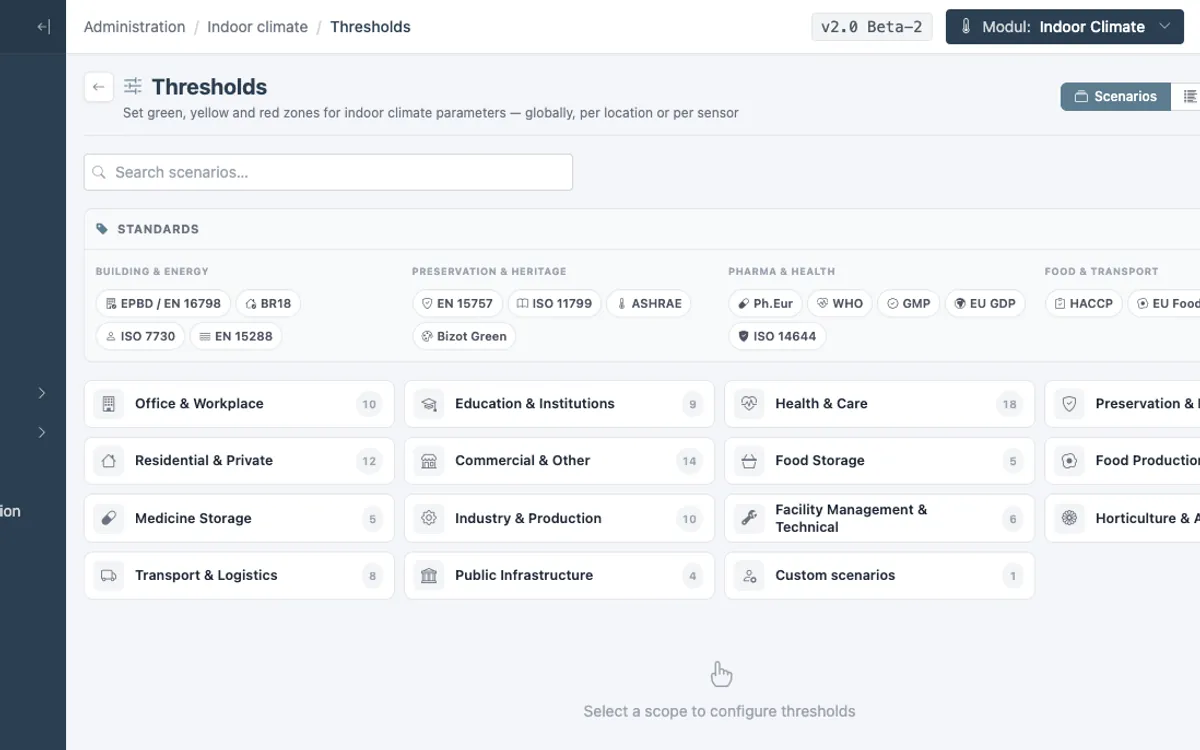
A scenario is a ready-made set of thresholds for temperature, humidity, CO2 and TVOC, tailored to a particular type of room. There are 135 of them in the Indoor climate in RoomAlyzer Air system, organised into 14 groups from open-plan office and nursery to museum store, cold room and server room. When you assign a room a scenario, the whole system knows straight away what green, amber and red mean in that room: dashboards, charts, maps, notifications, deviations and reports all use the same figures.
Why one threshold for the whole building does not work
The obvious first attempt is to put the same threshold on every sensor. That holds until the day the archive room sits amber all winter because it is following the office’s requirements — or the cold room shows green at 12 degrees because nobody has told the system what a cold room is.
Rooms have wildly different requirements, and those requirements come from different places. An office follows comfort requirements for people. A store follows preservation requirements for objects. A cold room follows food safety rules. A plant room follows operational practice. There is no single set of figures that makes sense for all of them — and if you try, you end up either with alarms nobody responds to, or with rooms nobody keeps an eye on.
The traffic light: five zones, not two
Every scenario describes more than a single limit. Zones are defined for each parameter:
| Parameter | Red (below) | Amber (low) | Green | Amber (high) | Red (above) |
|---|---|---|---|---|---|
| Temperature | < 21 °C | 21–22 °C | 22–26 °C | 26–27 °C | > 27 °C |
| Humidity | < 30 %RH | 30–35 %RH | 35–65 %RH | 65–70 %RH | > 70 %RH |
| CO2 | — | — | < 800 ppm | 800–1,200 ppm | > 1,200 ppm |
| VOC | — | — | < 200 ppb | 200–400 ppb | > 400 ppb |
| Sound level | — | — | < 45 dB | 45–60 dB | > 60 dB |
The table is the ‘Open-plan office’ scenario in summer. Note the asymmetry: temperature and humidity have both a lower and an upper limit, while CO2, VOC and sound level can only be too high. The amber zone is there because reality does not switch from fine to alarm at a single number — it gives your team a warning while there is still time to do something.
Summer and winter are not the same room
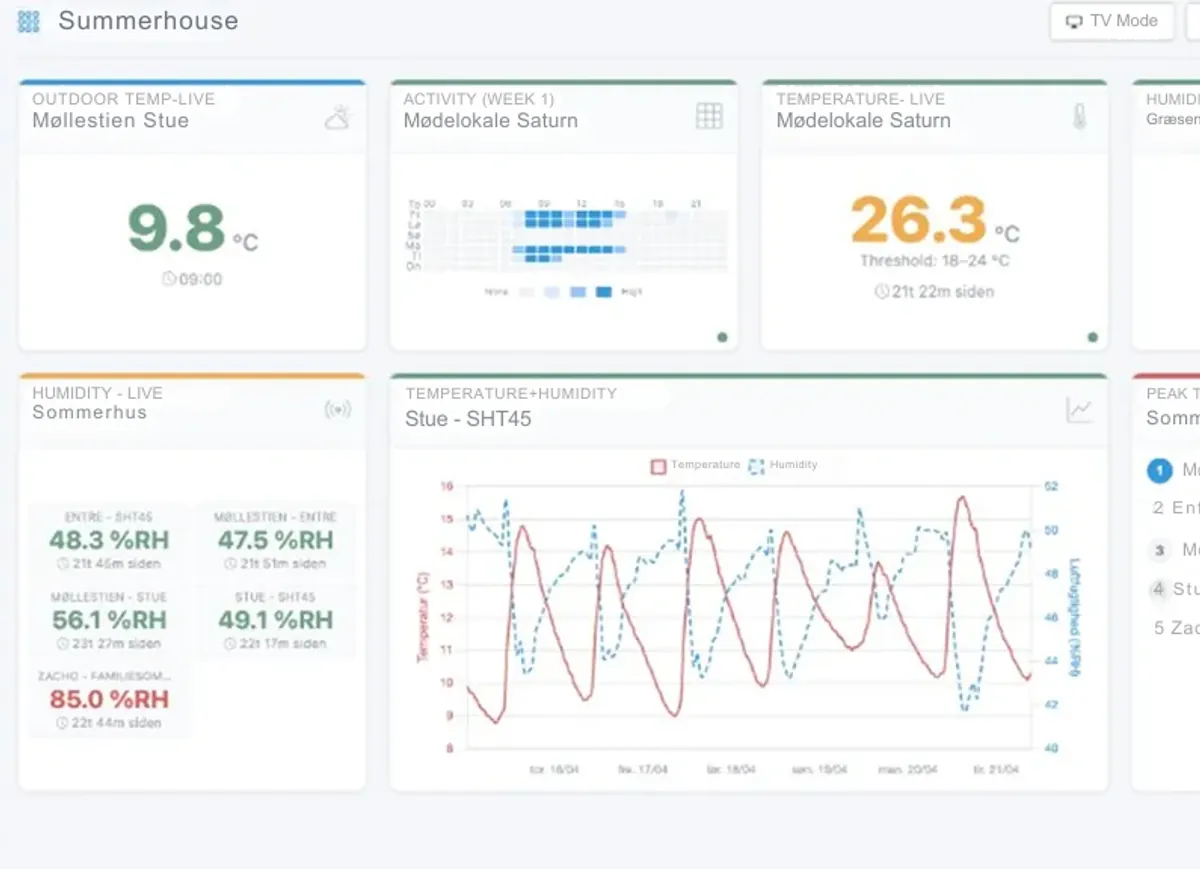
Many scenarios have different thresholds for summer and winter, because comfort requirements shift with the outdoor temperature. The body adapts: 25 degrees is pleasant in July and oppressive in February. As a rule the acceptable temperature band sits a couple of degrees higher in summer, while the humidity band is wider in winter, because cold air is naturally drier.
RoomAlyzer Air switches automatically. Summer is 1 May–30 September, winter is 1 October–30 April. You can see the switch directly in the charts: over a period that crosses either date, the coloured zones are split, and a dashed line marks where the thresholds changed. That spares you the classic confusion about why a room was green in April and amber in May without having changed at all.
The 14 groups — and the standard behind each one
The scenarios are organised by what the room is used for: Office and workplace, Education and childcare, Health and care, Preservation and heritage, Residential and private, Commercial and other, Food and storage, Food production, Medicines and storage, Industry and production, Transport and logistics, Building operations and plant, Horticulture and agriculture, and Public infrastructure.
What matters is that the thresholds were not invented for the occasion. Offices, schools and homes follow EN 16798-1 and the Building Regulations. Preservation and heritage follow EN 15757, ASHRAE chapter 24 and Bizot Green, while archives also lean on ISO 11799. The food area follows HACCP and the EU hygiene regulations, medicine storage follows Ph.Eur. and the WHO, and industry follows ISO 7730, with GMP on top for cleanrooms.
Two groups have no external standard: Building operations and plant, and Horticulture and agriculture. There the thresholds rest on ordinary operational practice and agronomic practice — and we would rather say so out loud than invent a standard that does not exist.
Many scenarios also carry an EPBD comfort category from EN 16798-1: category I for vulnerable groups such as hospitals and nurseries, category II for offices and schools, category III as an acceptable minimum in existing buildings. That category is exactly what the EPBD report later uses to decide whether the room lived up to its own level.
How to assign a scenario in RoomAlyzer Air
It happens under Administration → Thresholds, which opens on the Scenarios tab:
- Choose a group — Office and workplace, for example.
- Click a scenario and see its actual thresholds for every parameter and every season.
- Click Apply and choose the sensors or whole locations it should cover.
You can filter the list by standard if you only want to see the ones that are EPBD-relevant, or only the ones that follow HACCP. Indoor climate sensors can also be given their scenario directly under Administration → Sensors, while water detectors, space sensors and push buttons have no scenario selector — they measure something else.
Afterwards you can see the assignment in the sensor list: if every sensor at a location shares the same scenario, the name appears on the location row, and hovering over it gives you a card with the scenario name, the sensor ID and the actual thresholds for temperature, humidity and CO2.
If none of the 135 fits your rooms, you create your own on the same page. Your own scenarios appear in a group of their own, apply only to your own account, and have no standard attached — which is honest too, because then everyone knows the figures are yours.
If you want to see what the thresholds are used for afterwards, deviations are explained here, and notifications are where a threshold becomes a message.